Nylon Laptop Backpack: Big Capacity for Campus & Travel
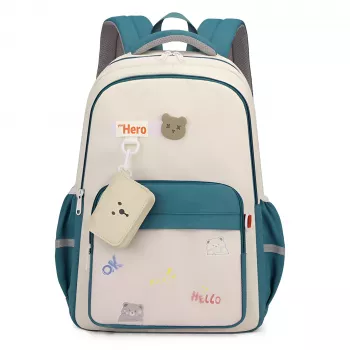
Large Capacity Nylon College Backpack for Laptop & Travel: What It Holds, How It Wears, and Where It Fits
A reliable backpack has to move smoothly between lectures, commutes, and weekend trips—while protecting a laptop and staying comfortable when fully packed. This guide breaks down what to look for in a large-capacity nylon backpack, how to pack it for school and travel, and the small design details that make a big difference day to day.
Why a large-capacity nylon backpack works for campus and travel
Nylon is a smart everyday material when you want a bag that can handle busy routines without feeling heavy. It tends to balance durability and weight well, so you can carry a full loadout without the bag itself adding unnecessary bulk. For students and commuters, that matters on long walks across campus, standing-room-only trains, or airport terminal sprints.
A large-capacity design also helps consolidate what would otherwise become multiple “extras” in your hands: laptop, charger, notebooks, a light jacket, and a snack can all live in one place. That reduces the chance of leaving something behind and makes transitions—class to library to café—faster and less stressful.
Look for a structured main compartment that opens wide and keeps items stacked rather than slumped. It’s the difference between packing like a small suitcase for a weekend and digging through a collapsed fabric cave. Smaller pockets round it out by keeping school essentials (pens, ID, earbuds) from disappearing to the bottom.
Finally, the backpack format itself is an advantage. Two straps distribute weight more evenly than a one-shoulder tote, which can be a big deal when you’re carrying dense items like textbooks or a laptop for hours.
Comfort and fit details that matter when the bag is full
When a backpack feels “fine” empty but miserable when packed, comfort features are usually the missing link. Start with shoulder straps: wider, well-padded straps reduce pressure points and help prevent that strap-edge digging feeling during long days. Strap adjusters should glide smoothly and hold their position once set.
A padded or lightly structured back panel helps in two ways: it improves comfort against the spine and keeps a laptop from shifting as you walk. If the back panel is too floppy, the load can sag and pull your shoulders backward; if it’s too rigid without padding, it can feel harsh against your back.
Weight distribution is the easiest comfort upgrade you can make without buying anything new. Place the laptop closest to the back panel, then stack flatter items (folders, a thin notebook) in front of it. Bulky items can sit farther away from your back, where they won’t throw off balance as much.
Also check high-stress zones: the grab handle and strap anchors get yanked daily. Reinforced stitching here is a small detail that often predicts long-term durability.
Laptop protection: sleeves, padding, and smart packing
For laptop carry, the most useful feature is a dedicated sleeve that keeps the computer from sliding into hard items like chargers, power banks, or water bottles. Even if the bag is roomy, separation prevents corners from getting bumped and surfaces from getting scratched.
Padding placement matters as much as padding amount. Bottom padding—or a false bottom design where the sleeve sits slightly above the base—reduces risk when the bag is set down quickly. That little “drop zone” can soften impact on the laptop’s lower edge.
If you travel with spare batteries or power banks, pack them where you can access them easily during screening. For current guidance on what can go through checkpoints, reference TSA’s “What Can I Bring?” and the IATA lithium battery overview for broader transport considerations.
Capacity planning: what to carry for a school day vs. a weekend trip
| Use case | Core items | Best pocket placement |
|---|---|---|
| Class day | Laptop, 1–2 notebooks, charger, bottle, snacks | Laptop in sleeve; chargers in accessory pocket; snacks in front pocket |
| Library/long study block | Laptop, notebook, charger, headphones, light jacket | Jacket in main compartment; headphones in quick-access pocket |
| Weekend trip | Outfits, toiletries, tech pouch, documents | Toiletries in separate pouch; documents in interior pocket; tech pouch near top |
Nylon performance: spill resistance, abrasion, and everyday care
Daily usability features that reduce hassle
A practical option to consider
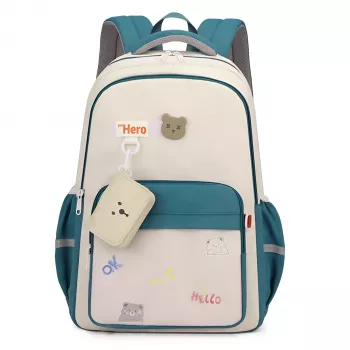
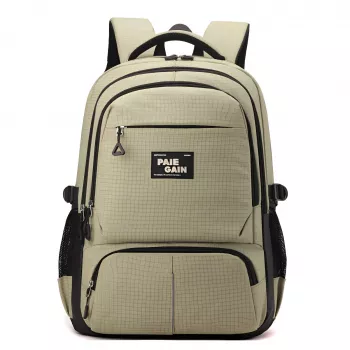
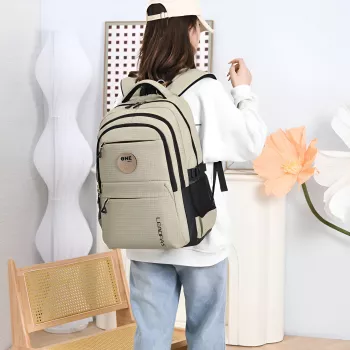
If you want a single bag that can cover weekday classes and short trips, the Large Capacity Nylon College Backpack for Laptop & Travel is designed for roomy everyday carry with an easy transition to weekend packing. It’s a strong match for students, commuters, and travelers who prefer one dependable backpack rather than rotating between multiple bags.
For days when you want a lighter carry—like quick errands, coffee runs, or events where a backpack feels too casual—pairing with a smaller everyday bag can help. The Soft Leather Retro Tote Bag for Women works well as a grab-and-go alternative when you don’t need full backpack capacity.
FAQ
Will a large-capacity backpack fit under an airplane seat?
It depends on the airline’s personal-item dimensions and how fully the bag is packed. Measure your backpack and compare it to your carrier’s limits; softer nylon bags often compress more easily than rigid bags when you need a tighter fit.
How can a laptop be protected in a backpack without a hard shell?
Use a padded sleeve, place the laptop closest to the back panel, and avoid packing heavy items that press directly against it. Bottom padding or a false bottom also helps reduce impact if the bag is set down quickly.
How should a nylon backpack be cleaned without damaging it?
Spot-clean with mild soap and water, avoid harsh chemicals, and skip high heat. Empty crumbs and dust from pockets and seams first, then let the bag air-dry completely before storing.







Leave a comment