Hall-Effect Wireless Gamepad: Cross-Platform & Dock
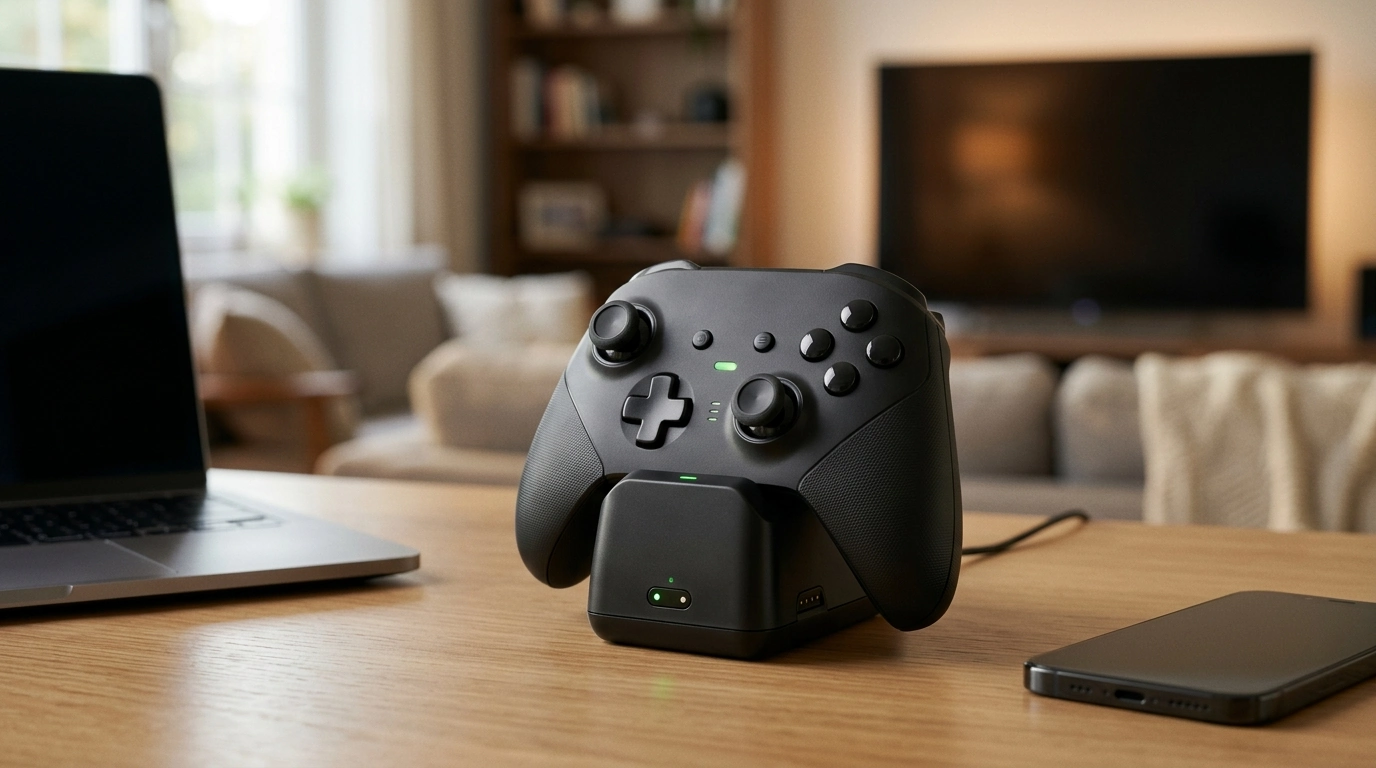
Wireless Hall-Effect Gamepad with Cross-Platform Support & Charging Stand
A wireless controller that aims to stay accurate over time, move easily between devices, and stay ready to play thanks to a charging stand. This guide breaks down the features that matter most—Hall-effect sticks, connectivity, latency feel, comfort, and daily charging—so it’s clear what to expect before buying and how to get the best setup once it arrives.
At a glance: what this controller is built to do
- Reduce stick wear concerns by using Hall-effect sensing for analog movement
- Switch between common gaming platforms without needing separate controllers
- Keep charging simple with a dock-style stand for quick drop-in power
- Offer a living-room-friendly setup: wireless play, quick pickup, fast reconnect
If you want a single go-to controller for PC, console-like setups, and mobile sessions, a wireless model with multiple connection modes and a charging stand is designed to remove the “where’s the cable?” friction and make pick-up-and-play feel natural.
Hall-effect sticks: why they matter for accuracy and longevity
Hall-effect sensors track movement by measuring changes in a magnetic field instead of using a rubbing contact surface like many traditional potentiometer-based sticks. The idea is simple: fewer wear points in the sensing method can help maintain a stable center and smooth tracking as the controller racks up hours. For background on how Hall-effect sensing works, see Encyclopaedia Britannica’s Hall effect overview.
- Hall-effect sensors measure magnetic field changes rather than relying on physical contact points that can wear down.
- Typical benefits include steadier centering over time, smoother micro-adjustments, and reduced drift risk tied to sensor wear.
- What to still watch: calibration options, dead zone tuning in games, and the mechanical quality of the stick assembly.
- Best matches: competitive shooters (fine aim), racing (progressive steering), and long sessions where consistency matters.
Even with Hall-effect sensing, the “feel” still comes from the stick mechanism—springs, housing tolerances, and caps. Plan to spend a minute in a game’s training range to tune sensitivity and dead zones so small inputs register without introducing unwanted movement.
Cross-platform support: connection options and practical expectations
Cross-platform controllers typically support some combination of Bluetooth, a 2.4GHz USB receiver, and USB wired mode. Each option has a different balance of convenience, responsiveness, and compatibility. Bluetooth standards are maintained by the Bluetooth SIG (Bluetooth Core Specification), and wired support depends on the USB implementation (USB-IF documentation).
- For PC: confirm whether your game expects XInput or DirectInput and choose the matching controller mode when available.
- For consoles and mobile: ensure the controller mode aligns with the device’s supported controller standard.
- For the smoothest first pairing: fully charge first, then pair in a quiet wireless environment before adding lots of nearby Bluetooth devices.
Connection modes and what they’re best for
| Mode | Best for | What to check before using |
|---|---|---|
| Bluetooth | Phones/tablets, casual PC play, travel | Device supports gamepads; pair in the correct controller mode |
| 2.4GHz (USB receiver) | Lower-latency PC play, couch gaming setups | Receiver included; available USB port; stable line-of-sight |
| USB wired | Tournament-style reliability, charging while playing | Cable length; supported input mode; driver prompts on PC |
Charging stand: daily convenience and battery habits
A dock-style stand is about routine: drop the controller in when you’re done, and it’s ready when you are. It also reduces cable clutter and makes it obvious where the controller “lives,” which helps in shared spaces.
- A charging stand supports quick drop-in charging and consistent storage between sessions.
- Practical wins: fewer loose cables, fewer dead-battery surprises, simpler hand-offs in a household.
- Battery habits that help: don’t leave it fully drained for days; top up between sessions; store at a moderate charge if you won’t use it for a while.
- If the stand uses contact pins: keep contacts clean and make sure the controller sits squarely so it charges every time.
Comfort and control feel: what to evaluate in the first 10 minutes
Specs don’t tell the whole story—comfort does. Right after unboxing, a quick “fit and function” check can reveal whether this controller will stay comfortable through long nights.
Setup checklist for PC, console, and mobile
What’s typically included and what to verify on arrival
Common issues and fast fixes
Price-to-value snapshot
In-stock picks to compare
- Wireless Hall-Effect Gamepad with Cross-Platform Support & Charging Stand ($43.97)
- Ultralight Non-Slip Aluminum Bike Pedals with Sealed Bearings ($39.82)
- Soft Leather Retro Tote Bag for Women ($25.51)
FAQ
Do Hall-effect sticks completely eliminate stick drift?
No—Hall-effect sensing reduces drift related to potentiometer wear, but drift-like behavior can still come from calibration, overly aggressive dead zone settings, debris, or mechanical wear in the stick assembly. Start with moderate dead zones, lower gradually, and bump them up slightly if you see slow movement at rest.
What’s the best connection type for low-latency play?
USB wired and 2.4GHz receiver modes are typically preferred for responsiveness and stability, especially on PC. Bluetooth is great for convenience and travel, but it can feel slightly less consistent depending on the device—testing each available mode is the quickest way to find your best option.
How should the charging stand be used to keep charging reliable?
Seat the controller squarely so the contacts meet cleanly, keep the pins/contacts free of dust, and power the stand from a stable source. Avoid running the battery to empty repeatedly, and use the dock as the default storage spot between sessions so it stays topped up.









Leave a comment